Free for every ER:LC community

Run your ER:LC server from Discord.

Session panels, 911 dispatch, staff shifts, tickets and moderation in one bot, with a web dashboard for every setting.

Running in 87 servers with 3,713 members.

The sessions panel. Post it once and it keeps itself up to date.

Everything a session needs, already connected

A 911 call becomes a dispatch incident, in-game time becomes shift hours, and every action lands in the right log.

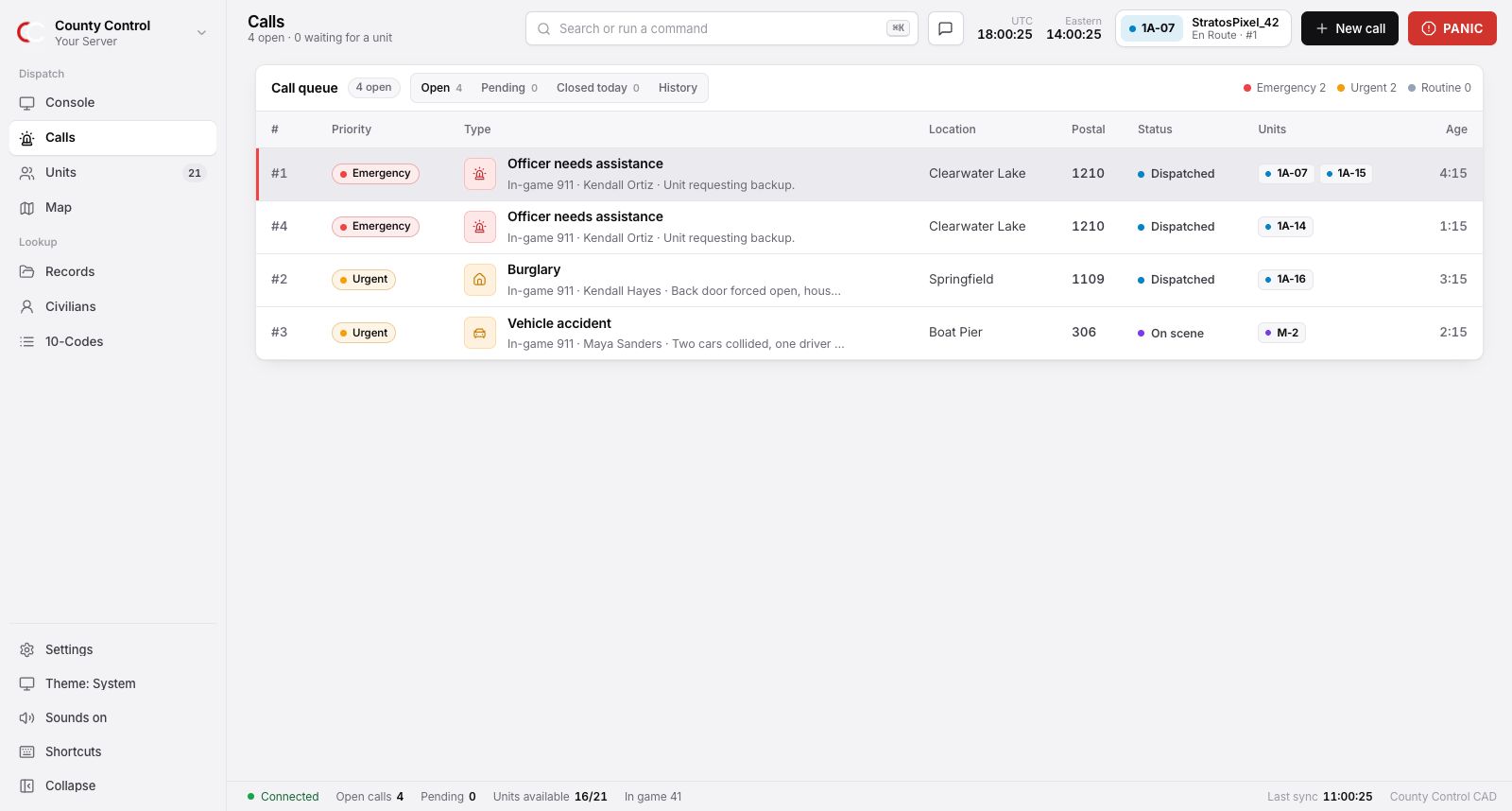
Dispatch with real 911 calls

An in-game 911 call is posted as an incident with the caller, location and departments filled in. Units claim it, update it and resolve it, and the timeline is saved.

  • /event create Open an incident
  • /priority Request priority
  • /erlclog calls Send 911 calls to a channel
The County Control call queue with four in-game 911 calls, their priority, location, postal and assigned units.

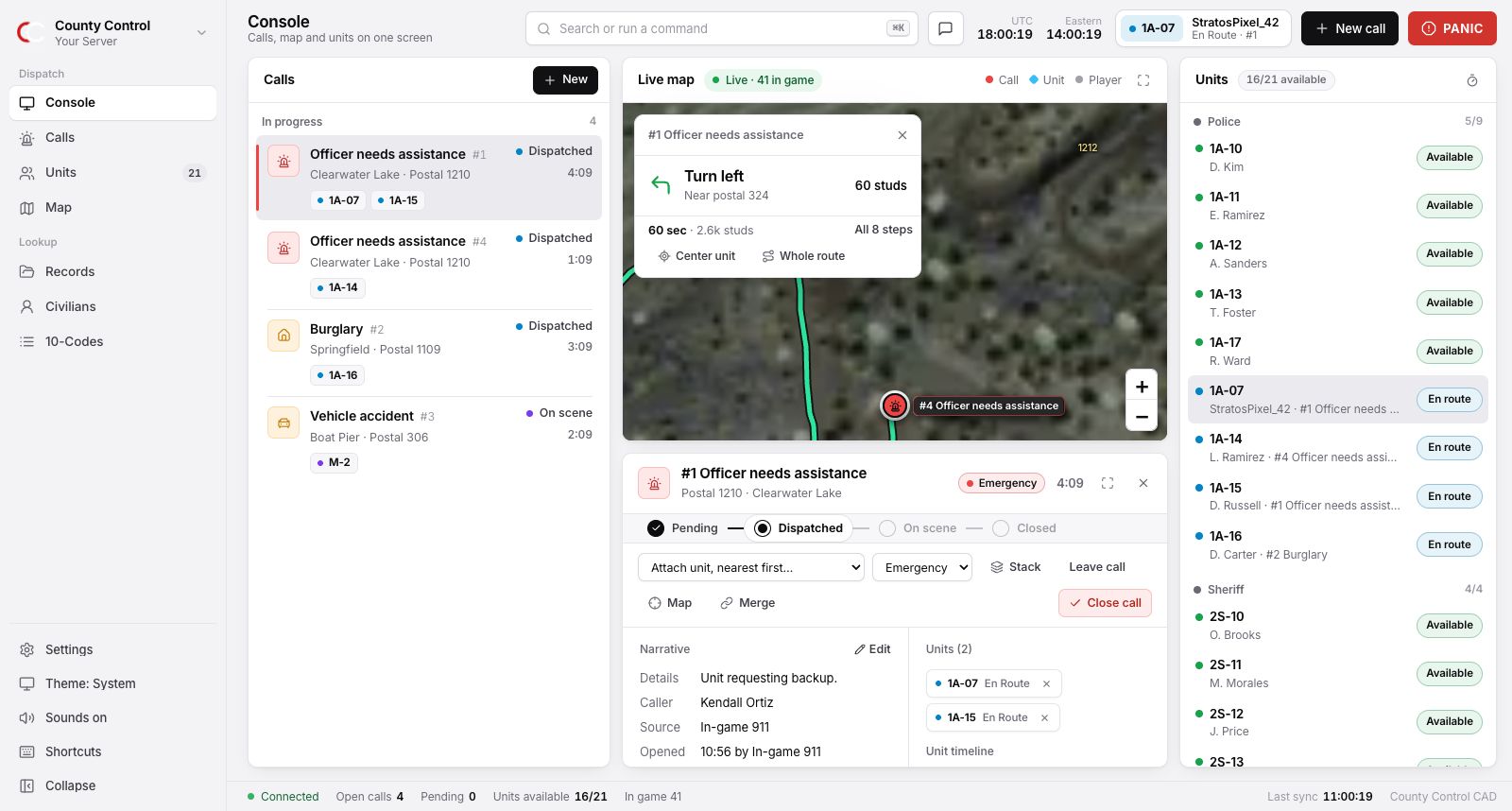
A real CAD for your dispatchers

Calls, the live map and every unit on one screen. In-game 911 calls arrive by themselves, the right unit is sent in one key, and units hear about it in-game. It runs in the browser, so nobody has to install anything.

  • The real ER:LC map with postals and directions
  • One-key dispatching, stacking and merging
  • Traffic stops, backup and panic for units
  • Records, warrants and BOLOs that fill themselves in
The County Control CAD console with the call queue, live map and unit board.

A dashboard that's faster than commands

Sign in with Discord and manage every server you own. Pick channels and roles by typing, rewrite messages with a live preview, see who's on shift and read the moderation history.

  • Search channels and roles as you type
  • Choose which roles can use each command
  • Post panels to a channel in one click
Sessions channel
#sessions
Session ping role
@Session Ping
Start-up vote goal
8 votes
911 calls channel
#dispatch
Weekly shift quota
3 hours
Who can use /ban
@Moderator, @Admin

The rest of the bot

None of this is a separate app or a paid add-on.

Session panels

One panel that updates itself with the player count, queue, staff in-game and join code. Start-up votes with a goal you choose, session pings, and a closing message that says how busy it got.

  • /ssu vote Open a start-up vote
  • /sessions Post the live panel
  • /join Get the join code

Shifts staff actually use

Clock on with a button, or link a Roblox account and in-game time counts by itself. Weekly quotas, a live roster, a leaderboard and leave of absence, without a spreadsheet.

  • /duty on Clock on
  • /duty link Count in-game time
  • /duty leaderboard Who put the hours in

Moderation with a paper trail

Ban, kick, timeout and warn from Discord, and ban the Roblox account in-game at the same time. Every action is a numbered case you can search and correct later.

  • /ban Ban a member or user ID
  • /case View a case
  • /reason Fix a case's reason

Tickets and applications

Ticket types with their own category and support role, claiming, staff controls and saved transcripts. Application forms you build, with accept or deny and the applicant told automatically.

In-game commands

Announce, message a player, kick, or start priority and peacetime timers without opening Roblox.

Activity logs

Kills, joins, leaves and in-game commands streamed to a log channel, batched so they never flood it.

Set up in about five minutes

Four steps. Run them in Discord, or click through the dashboard instead.

  1. Add the bot

    Invite County Control. It asks for Administrator because moderation, panels and anti-nuke all manage members and channels.

  2. Connect ER:LC

    Copy the server-key from your private server settings and run /seterlc. The owner opens /erlc authorize once for in-game commands.

  3. Pick your channels

    Run /setup for a checklist of what's done and what's missing, or choose channels in the dashboard.

  4. Start a session

    Run /ssu vote to open a vote or /ssu start to go straight to a live panel.

Questions

Is it really free?

Yes. There's no paid tier and no per-server fee.

What is the server-key, and is it safe?

It's the key in your ER:LC private server settings. County Control stores it for your server only, uses it only to talk to ER:LC for that server, and never shows it again, including in the dashboard. You can disconnect it from the dashboard at any time.

Do I need to whitelist an IP address?

No. County Control is registered with ER:LC as a public application, so the server-key is all you need. To run in-game commands from Discord, the server owner opens an authorization link once.

Who can use the dashboard?

Anyone with Manage Server or Administrator in the Discord server. You sign in with Discord and only see servers you can manage. Who can use each command is set on the Permissions page.

Can I make it look like my community?

Yes. Every line of the session and start-up messages can be reworded with a live preview, emoji are opt-in, and you can add your own banner images.

What data does it keep?

Your server's settings, moderation cases, shift totals, ticket records and application answers, so the features work. The privacy policy lists all of it and how to have it removed.

Who makes it?

Cordyx Studio, the team behind pcdev.dev. Questions or problems go to the support server.

Give your staff one place to run the server.

Add County Control and be running a session in minutes.